PrIMe data: Reaction rates - creating new
Opening the submission form.
primeHandle provides a submission form specially developed for entering new or editing existing reaction rate data.
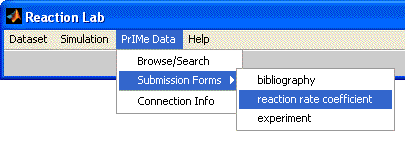
To get to the form, in reactionlab's main menu select "PrIMe Warehouse", then choose "Submission Forms",
"reaction rate".
Selecting the reaction.
Since the reaction rate record is subordinate to a chemical reaction, user is first presented
with search interface locked into chemical reactions collection. If reaction selection is cancelled by the user,
the primeHandle code automatically cancels the reaction rate record creation. Once the reaction has been selected,
empty submission form will open. Once selected, reaction to which the rate reffers cannot be changed.
Selecting the rate law.
The form is menu-driven for quick, easy and error-free data entry. User begins entering the reaction rate data by
selecting the rate law type. The rate law type affects the options in the rest of the submission form - whether the
rate coefficient expression, third body, pressure dependence or links to limiting pressure rates need to be specified.
Reaction rate coefficient.
For maas-action-law-obiding reactions user provides the reaction rate coefficient. In case of unimolecular or chemically
activated reaction the user provides only pointers reaction rates to be used as low- and high-pressure limiting rates.
This implies that, before entering unimolecular or chemically activated reaction rate record, rate records to be used as
limiting-pressure rates need to already exist in the PrIMe Warehouse.
Third body.
For reactions involving third body user provides a pointer to the species acting as the third body. Similarly to individual
rate records to be used at pressure limits, third body species have to exist in the PrIMe Warehouse before the rate involving
such species can be entered.
Collision efficiences.
Collision efficiences - relative ratios of reaction rates with different third bodies (and thus derived property) - are
included only implicitly. Instead of specifying collision efficiency factors, PrIMe warehouse stores reaction rate involving
each collider separately. It is the duty of the simulation software to calculate ratios of the reaction rates involving
different third bodies if that is needed. This way collision efficiences are not forced into scalar values (as independent
of temperature), but can take effectively any functional form, depending on the individual third body reaction rate expressions.
Tabulated pressure dependency - cut-and-paste data transfer from other applications.
For presure dependent reaction rates - those of unimolecular or chemically activated reactions - pressure dependency can be
described either through one of falloff formalisms (classical Lindeman-Hinshelwood, with Gaussian or Lorentzian broadening with
constant or Troe centering, Generalized Mean of Limits, SRI), or as tabulated departure of rate coefficient from limiting value at
infinite pressure. In the latter case if the tabulated data is available in digital form, either as a tab-, comma- or space-separated
ASCII file, or a table in Microsoft Word or Excel files, one can speed up the data entry into by selecting and copying the data from
the originating file, and pasting (using "Edit" => "Paste k/kinf data" commands from the Form's menu) into the k(P) table.
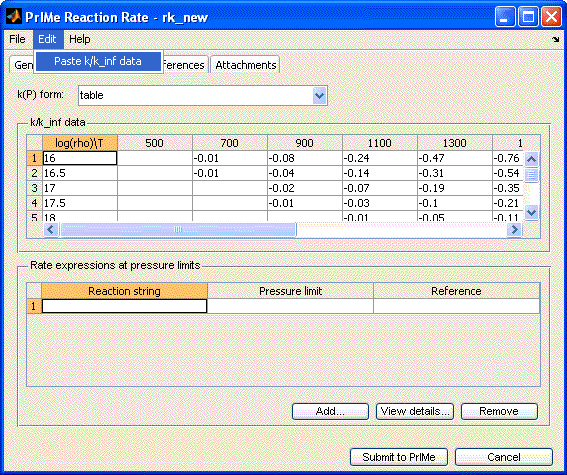
Whichever the file type for this copy-and-paste data transfer, to be properly imported into PrIMe Reaction Rate submission form,
the k/kinf data needs to include as the first row and column data headers - temperature and density, as in the following Excel
screenshot:

Related links: